Simplify Online Fundraising with These 4 Free Tools

Simplify Online Fundraising with These 4 Free Tools

Simplify Online Fundraising with These 4 Free Tools

Simplify Online Fundraising with These 4 Free Tools

For new nonprofits, advocacy groups, and other small fundraising teams, raising money online can feel like a major challenge. Your peers say you need a whole set of expensive software solutions to reach donors, while your budget barely covers staff pay. You may start to rely on free generative AI tools like ChatGPT and wonder what else is available to help your organization get on its feet at no cost.

Fortunately, you’ve got options! In this post, we’ll share four types of free fundraising platforms designed to simplify your team’s work without straining your budget.

1. Free Crowdfunding Pages

If you’re new to fundraising, this should be the first tool you try. Crowdfunding sites like GoFundMe and Kickstarter allow anyone to start a basic online fundraiser for free. All you have to do is sign up—in a few minutes, you can create a fundraising page to start collecting donations.

Customizable crowdfunding pages typically include:

  • A personalized fundraiser name and photo.
  • Description of your organization and why you’re raising money.
  • Your fundraising goal and real-time progress toward it.
  • Optional updates from your team throughout the fundraiser.
  • Basic donation form with the option to tip the platform.

Crowdfunding is one of the simplest forms of online fundraising. Whether you use this tool to launch one-off crowdfunding campaigns or act as a temporary donation page until you have the budget to build out a full website, it’s an easy way to raise funds with no hassle.

Note: While these tools are free to use, be mindful that most charge a small transaction fee per donation, such as 2.9%. This means if a donor gives $100, you’ll receive $97.10.

2. Free Product Fundraising Apps

Product fundraisers have universal appeal since donors get something in return for their generosity, but they’re often hard to run for small groups. Traditionally, you would partner with a product fundraising provider, go door-to-door with paper order forms, collect cash, and coordinate item delivery. 

Nowadays, there’s an easier way. You can use product fundraising apps to easily run 100% online campaigns, whether you want to sell popcorn, cookie dough, branded merchandise, or more. Get started for free and receive a percentage of the sales revenue in your organization’s bank account. Some app providers even handle delivery for you!

For example, Team Butter explains that you can run a cookie dough fundraiser on their app in just a few steps:

  1. Sign up and create a fundraiser using the app. Choose which product to sell and add basic information about why you’re raising money.
  2. Share the fundraiser with your group and have participants create individual fundraising pages. If different team members or volunteers will be selling products on your organization’s behalf, they should each have their own page or online store. Have them add their personal fundraising goal and story to make the page their own.
  3. Participants share their fundraising pages with supporters. Additionally, share the link to your page via text message, email, social media, or any other channel. Supporters can browse products and place orders at any time.
  4. Products ship directly to supporters, and you get paid! When your fundraiser ends, your work is done. Supporters get products shipped to their doors, and your organization receives its portion of the profits.

Most often, groups turn product sales into peer-to-peer fundraisers that leverage the power of their community’s personal networks. The right product fundraising app simplifies the process for donors and volunteers.

3. Free Project Management Tools

Sometimes, all it takes to streamline your fundraising is team communication. With free project management tools like Asana or Trello, everyone on your team can create organized task lists and project workflows, then update them in real time to keep work on track.

These tools clarify team member responsibilities and facilitate collaboration, paving the way for more organized, successful fundraising efforts. You can use them for any type of project—assign tasks for generating fundraiser ideas, drafting and sending appeals, following up with donors, etc.

Plus, most free project management tools are fully web-based, so team members can access their tasks from anywhere. This makes it easier for busy, volunteer-led teams to thrive, no matter where they are.

4. “Free” Basic CRMs

Constituent relationship management (CRM) software, also known as a donor database, helps your nonprofit store and manage information about supporters. When this data is easily accessible, you can improve fundraising outreach, track event attendance, and build lasting donor relationships.

Most CRMs are complex solutions with a monthly or annual cost (sometimes per user license) that can take up a large chunk of your budget. If you’re looking for a powerful CRM that you can customize to fit your nonprofit’s unique needs, you’ll have to spend money to purchase, implement, and customize it.

If you only need the basics, however, providers like Givebutter offer “free” databases you can consider. We say “free” here because these solutions come with a few major caveats:

    • Fees are often passed on to donors. Instead of charging your nonprofit a processing fee, many free platforms ask your donors to pay it. You may be required to turn on “donor tipping” and ask supporters to pay additional fees when they give.
    • There may be hidden costs. Large-scale CRMs like Salesforce offer a few free user licenses to nonprofits. However, once you get started, you might run into charges for implementation, consulting, and platform customization.
    • Lack of features may cause you to spend more. The limited functionality of free CRMs might lead you to invest in several additional solutions, ultimately increasing costs. Or, your system might push you to upgrade to its paid version to access crucial features like automation.

Whether a free system is worth these cons ultimately depends on your organization. Here’s what the experts at Bloomerang say about the potential drawbacks of free CRMs:

“When it comes to free fundraising software, you often get what you pay for. That means you likely won’t see the results—increased fundraising revenue, increased donor retention rate, increased average gift size—that you would likely see when using a paid solution. Plus, these free solutions can often limit your ability to fundraise effectively, costing you even more money than what you’d spend to invest in a paid fundraising software solution.”


That said, some nonprofits just can’t justify spending the time and money it takes to implement a large-scale database. If your organization is just starting out or simply wants to move beyond spreadsheets, a basic CRM could be a great way to scale up your fundraising efforts.

Each of these tools comes with pros and cons, but they can make a major difference in your nonprofit’s fundraising potential without cutting into your budget. As you evaluate your options, make sure to check provider websites and online reviews to determine which free tools are the best fit for your needs.


Mastering AI Prompting for Grant Writers: 4 Pointers

3 Tips to Use Donor Data to Improve Nonprofit Storytelling

Mastering AI Prompting for Grant Writers: 4 Pointers

3 Tips to Use Donor Data to Improve Nonprofit Storytelling

AI platforms have been game-changing for grant writers. Learning how to use AI tools effectively leads to improved efficiency and higher-quality proposals, leading to more grants won and more impact on the ground.

You’ve likely seen or heard many stories by now that might make you think twice about using AI for grant writing—like AI chatbots providing nonsense answers to simple questions. However, what sets expert AI users apart from the victims of (sometimes funny, sometimes serious) AI mishaps often comes down to how you approach this technology. 

AI is a tool for you, the human with context, judgment, and common sense, to master and use. It’s not a replacement for careful thought and hands-on quality control.

AI has been with us long enough now that best practices have emerged, specifically around prompting, which involves the inputs or instructions you give generative AI tools that shape their outputs. You then use these responses to compile and curate your grant proposals. Effective AI prompting can make the difference between a won grant and a jumbled proposal that fails to get noticed.

Let’s walk through four essential tips for prompting AI for grant writing tasks.

1. Remember that Context is Essential.

Generative AI is often general AI—meaning these platforms are typically designed to serve many purposes. ChatGPT, for example, is built to be useful for any situation, so it isn’t deeply trained on your particular area of operations or nonprofit subject matter.

This generalized training means you can’t provide a general or vague prompt to a generative AI tool and expect a detailed, perfectly aligned response. You have to provide it with the appropriate context to generate useful answers.

Learn Grant Writing’s guide to AI prompting recommends a four-step framework for building the appropriate context with a generative AI platform:

  1. Build fundee context. Provide the AI tool with background information about your nonprofit, mission, history, specific project, and grant application. If you’ve hosted kickoff meetings with your team about the grant, try uploading transcripts. After laying this foundation, you should be able to generate helpful first drafts of your proposal sections about background, project descriptions, and goals.
  2. Build funder context. Then, explain important details about the funder to the AI platform. Gather any relevant information about the funder and grant opportunity—focus areas, eligibility requirements, specific language the funder uses, etc.—and provide it to the AI. Generate a “funder profile” summary that the AI can more easily reference going forward.
  3. Merge fundee and funder context. Use the combined insights, including your first background sections of your proposal and the “funder profile,” to generate drafts of the remaining sections of your proposal. Review, correct, refine, and retry as needed as you go.
  4. Customize and reiterate with advanced techniques. For more complicated proposals or situations, you may need to take additional steps to refine your AI strategy. For example, you might build a custom AI model with preconfigured training and context or use multiple AI tools for different purposes in an orderly workflow.

These steps may sound like a lot of work, but by putting time and effort into these first steps, you can drastically increase the quality and relevance of an AI’s outputs, saving you significant time in the long run. If you don’t provide careful context upfront, the time required to correct and adjust the AI’s responses will mean you might as well have written it from scratch.

2. Understand the Importance of “Chain Prompting.”

When using AI for grant writing, it’s not just about what you ask the AI to generate—it’s also about how you ask it. To save time (and reduce headaches), you’ll need to master a technique that’s all about breaking down your tasks into smaller, more manageable parts. 

If you’ve ever given a vague or overly broad prompt to an AI tool, you’ve likely seen how quickly things can go off track. Why? Because, unlike humans, AI can’t make those logical leaps or fill in contextual gaps. It needs clear, structured guidance to deliver meaningful results.

So, what exactly is chain prompting? In simple terms, chain prompting is the process of breaking a complex task or request into smaller, discrete steps. 

Rather than asking AI to tackle a big question all at once, you guide it step-by-step, ensuring that it has the context it needs at every stage. This approach helps you keep the AI on track and makes it easier to get the specific responses you’re looking for.

For example, let’s say you’re planning an advocacy campaign to raise awareness about environmental policy changes in your area. This is a complex task with many moving parts, and if you simply ask AI, “Help me plan my advocacy campaign,” it might give you a general outline, but that won’t really save you any time if you then need to correct and fill it out yourself.

To get the best results, chain prompting helps you break down the campaign into smaller, manageable steps. Here is how you might approach the example above:

  1. Define your main objective: Instead of asking AI for a full campaign plan, start with a specific, clear prompt, such as, “What are the key objectives of an advocacy campaign for environmental policy change in [your region]?” Clearly state your objective and any specific goals to the AI.
  2. Identify your target audience: Next, ask, “Who are the key stakeholders for this environmental policy advocacy campaign? How can I engage local businesses, community leaders, and activists?”
  3. List campaign tactics: After identifying your audience, move on to specific tactics. You might ask, “What are the most effective strategies for grassroots lobbying in environmental campaigns that align with my objective and goals?”
  4. Set a timeline: Once you have your tactics, ask, “Can you help me create a timeline for accomplishing my goals in the next 6 months, broken down by key milestones and actions?”
  5. Create messaging: Finally, ask for something more detailed, like, “What should the core message of this advocacy campaign be to appeal to local policymakers, the general public, and funders in support of [specific policy]?”

With each step, you ensure the AI understands the context and gives you a more focused response. At each stage, you can adjust and refine based on your campaign’s needs, adding new prompts like, “How can I adjust the timeline if we experience a delay in the first milestone?” or “Can you suggest a more persuasive messaging strategy for engaging local government officials?”

At its core, this technique involves clearly stating what you want, breaking it down into specific steps or components, and getting confirmation as you go that the AI has retained the context along the way.

This process doesn’t just save time—it ensures the quality and relevance of the outputs you get. By guiding AI through a logical sequence, you’re more likely to end up with a detailed and coherent result that you can use in your grant proposals.

3. Clearly Define Your AI Use Cases and Limitations.

AI is incredible, but it’s not magic. It can’t (and shouldn’t) do it all. To truly make the most of it, you need to know exactly where it shines and where its involvement might actually create more work than it saves.

AI is fantastic for tasks like research, prep work, and drafting sections of text. It can help you gather relevant grant opportunities, create first drafts for certain sections of your proposal, and organize your thoughts. When it comes to business logistics for grant writing freelancers, AI tools can certainly save you time there as well.

But just because AI is fast doesn’t mean it’s the best option for every task. When you’re deep into more nuanced or creative work, like refining your message or tackling a groundbreaking approach, that’s where human expertise shines. Remember, AI is built on patterns from past information. It can’t easily come up with “new” ideas or solutions.

Think of it this way: AI can’t be your primary driver if you’re explaining a novel approach to a problem to a funder or trying to come up with innovative strategies for your project plans. It doesn’t have the same intuition, creativity, or understanding of the unique nuances of your nonprofit’s mission that you do. Use AI carefully in these situations—it’s better as a tool to support your thinking, not replace it.

Set clear boundaries for AI’s role in your process to ensure it works for you, not against you. Defining these use cases will simplify and improve your entire experience using it. 

Of course, you can experiment and add new use cases over time as you learn the best ways to prompt AI for different purposes, but be mindful of how long this takes—if you could do a task yourself at the same level of quality in the same amount of time, it should likely live with you.

4. Use Multiple AI Tools if Needed.

Mastering AI prompting is a critical part of grant writing success, but it’s not just about crafting great prompts. It’s also about using the right tools for the job

Think of it like creating a masterpiece: An artist doesn’t use just one brush to complete a detailed painting. They rely on a variety of tools, each designed for a specific task. The same principle applies to AI. While crafting effective prompts is important, choosing the right AI tool for each part of the grant writing process is just as crucial. 

Even with the best prompts, if you’re using the wrong AI tool, you’ll still struggle to get the consistent, high-quality results you need.

Some different tools you can use throughout the grant writing process include:

  • Research and Prospecting Tools: AI excels at scanning vast databases and bringing back relevant information quickly. For grant writing, this means tools that help you identify the right funding opportunities and learn more about funders’ giving histories.
  • Writing Assistants: These tools help organize your ideas, improve your sentence structure, check grammar, and refine readability. They can also help you keep your language consistent and ensure your proposal aligns with the funder’s expectations.
  • Data Analysis Tools: For proposals that require heavy usage of statistics or financial breakdowns, data analysis tools are essential. These tools help you process large amounts of information and distill it into meaningful insights that you can use to tell stories and support claims. 
  • Project Management Tools: AI-powered project management tools are great for staying organized during complex grant projects. They help you keep track of deadlines, assign tasks, set reminders, and even coordinate team efforts.

All-purpose generative AI platforms like ChatGPT can fit into all of these categories—but that doesn’t mean they necessarily should. Mastering AI prompting will ensure you can use ChatGPT and similar tools effectively for all kinds of tasks, but just remember that more specialized options exist. If your nonprofit wants to invest in its AI capabilities, it’s worth your time to explore a broader range of popular AI grant writing tools

You can even use AI tools to support grant management and report on impact later in the life cycle (but focus on improving your grant seeking process with AI first).

When you pair great prompting with the right tools, you’re setting yourself up for success. Choose wisely, and you’ll streamline your workflow, refine your proposals, and ultimately increase your chances of securing funding. 

AI prompting helps you create more effective, targeted proposals. With clear prompts, the proper context, and the right tools, you’ll get the best possible results every time.

Just keep in mind that while AI can streamline tasks and improve efficiency, your nuanced understanding of your nonprofit’s mission, goals, and challenges is irreplaceable. When you bring your insight and vision to the table, you’ll create proposals that truly shine.

Building Community with Donors: 5 Heartfelt Outreach Ideas

Outreach Ideas

Building Community with Donors: 5 Heartfelt Outreach Ideas

Outreach Ideas

Whether you’re cultivating large gifts from prospective major giving candidates or building up a community of moderate donors, fundraising ultimately comes down to relationships. No matter how much they plan to give, all supporters are more likely to donate if they feel a sense of community with your nonprofit. 

Nonprofit fundraising professionals know that every donor is different but that most supporter relationships rest on the same handful of building blocks. From expressing proper donor recognition to providing engagement opportunities, supporters are more likely to form a strong connection with organizations that provide heartfelt, thoughtful outreach. 

To inspire your nonprofit’s relationship-building strategies, this guide will explore five meaningful outreach ideas. 

1. Personalize outreach.

Your outreach will feel heartfelt and genuine if it feels personal. After all, donors are far more likely to feel like valued members of your community if they receive messages addressed by name rather than a generic “Dear donor.” 

To craft unique, individualized messages, use your marketing tools to implement segmentation and personalization strategies. Here’s how these two approaches work:

  • Segmentation organizes your supporters based on shared characteristics. This might include demographic information, engagement history, giving capacity, or any other factors you deem relevant. For instance, to guide your texting strategy, you might make one segment for supporters who have opted into SMS communication and another for those who have opted out. By doing so, you can be sure that the supporters who want to be contacted via text will get your messages without bothering those who don’t.
  • Personalization involves including details about individual supporters in your messages, such as their names and engagement history. For example, to a supporter on your SMS-friendly list, you might write them a donation appeal text that addresses them by name, thanks them for their last gift, and calls out their previous contribution’s specific amount. 

To keep your supporters organized and automatically fill out message templates with relevant information, you’ll need marketing software. Tools like a constituent management relationship system (CRM), email platforms, and text marketing apps can do most of the work for you. 

2. Send eCards.

Thank-you emails and texts are staples of every nonprofit outreach plan. You can elevate these communications and provide donors with meaningful messages they’ll want to hold onto with eCards. eCards are digital greeting cards that pair a thoughtful message with an eye-catching design. 

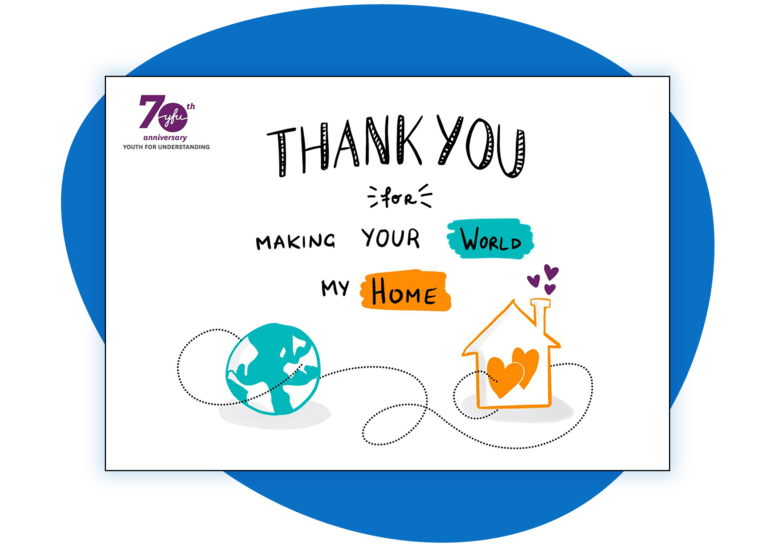
eCardWidget’s guide to charity eCards shows off this example of a thank you eCard from the nonprofit Youth for Understanding:

Outreach ideas ecard

This eCard demonstrates appreciation, shows off the nonprofit’s brand, and provides recipients with a fun visual that represents their donation’s impact. By adding graphics, photos, or even animations that represent your cause, you can connect with donors and reinforce their decision to support your organization.

In addition to thank you messages, nonprofits can also sell eCards to raise funds. For instance, a supporter might donate $25 and get an eCard that they can send to a friend or family member in exchange. This approach not only gives donors something in exchange for their gift but also helps promote and spread awareness of your nonprofit. 

3. Host appreciation events

To form a community around your nonprofit, bring your supporters together through in-person appreciation events. In-person events are opportunities to talk with your supporters one-on-one and encourage them to connect with one another. 

If you have a wide audience who live in geographically remote areas, you can also experiment with virtual events. Hosting a mix of in-person and virtual events gives all of your supporters a chance to engage with your nonprofit and build connections. 

Of course, to get supporters to attend your event, you’ll need to promote it. Get the word out by:

  • Sending personalized invitations. Reach out to donors with personalized invitations that address them by name. If supporters have attended past events, be sure to mention that and thank them for their previous participation. 
  • Previewing activities. Share details of what will happen at your event to intrigue guests and drive registrations. Feature photos and an itinerary so supporters can decide if they want to attend and share the details with others. 
  • Leveraging multiple marketing channels. Reach a wider audience and ensure supporters who RSVP don’t forget to attend by continuing to market your event across numerous channels. For instance, you might email your entire supporter base to fully explain your event and follow it up with a text message that provides the highlights or links to a website page with more details. Mogli’s guide to SMS marketing shares how links in text messages have a 19% click-through rate as compared to email’s 2.6%, making it a useful channel for drawing attention. 

Not every appreciation event has to be a major undertaking. For instance, you might throw an impromptu appreciation lunch for volunteers by taking everyone out to a local restaurant, or you could host weekly online trivia nights that donors can drop in on. 

4. Feature community spotlights

Give specific supporters a bit of public recognition with community spotlights. This outreach idea is a type of direct marketing fundraising, the act of marketing to one specific supporter rather than creating general messages for your entire audience. This type of fundraising tends to be highly individualized and thus can be very effective in making recipients feel recognized and valued. 

Additionally, community spotlights send a message to the rest of your donors. They’ll see that your nonprofit appreciates individual supporters who go above and beyond, which might inspire them to follow suit. 

Use your community spotlights not just as a way to show donor appreciation but also to encourage specific behaviors in the rest of your community. For example, you might spotlight a supporter who brought in the most revenue during a peer-to-peer campaign or someone who racked up 100 volunteer hours this year.

5. Share stakeholder videos

Let your stakeholders express how meaningful your donors’ support is in their own words by recording and sharing videos of them telling their stories

Sit down with a few stakeholders and ask them to discuss their experiences with your nonprofit and how support powered by donors has impacted them. In addition to interviews, add footage of your program sites and share photos of your volunteers in action so donors can see the tangible impact their support has made.

In addition to videos that express appreciation for your supporters in general, create personalized videos for notable individual donors. For instance, you might ask a few stakeholders to help record messages for major donors and then use that footage to create unique videos for each recipient. 

When you build heartfelt, meaningful relationships with your supporters, you can boost event attendance, earn volunteers, and maximize donations. To lay the foundation for these connections, assess your audience and start planning outreach strategies that will resonate with as many supporters as possible while maintaining a personal touch.

3 Easy Steps to Simplify the Prospect Research Process

Simplify Prospect Research

3 Easy Steps to Simplify the Prospect Research Process

Simplify Prospect Research

Many nonprofit professionals view prospect research as overly complicated and time-consuming. That’s because, for a long time, it was! Using multiple research databases, combing through social media, and exploring philanthropic reports consumed time and energy. 

However, the days of complex, manual research processes are behind us. Nowadays, AI tools and nonprofit CRM platforms offer simple solutions to help organizations streamline donor prospecting and earn more through major gifts.

Let’s explore three simple steps you can take to reduce the complexity of your prospecting efforts and find more new donors for your nonprofit organization

Step 1: Clarify the shared traits of your nonprofit’s major donors 

The prospect research process becomes much simpler when you first identify common characteristics among your nonprofit’s major donors. Doing so allows you to guide the prospecting process using hard data by applying historical knowledge to current research. 

Bloomerang’s guide to major donors outlines the following common traits of major giving prospects: 

  • High giving capacity: The exact giving amount that qualifies a major donor varies from nonprofit to nonprofit, but many organizations consider those who can give $10,000 or more as major prospects. 
  • Recent donations: Recent involvement with your nonprofit effectively indicates which supporters are currently engaged in your mission and may respond well to larger giving requests. 
  • Support related causes: Donors contributing large sums to similar organizations may be more inclined to support your cause. For example, donors contributing to local schools may also be interested in supporting an educational-focused nonprofit. Or, major donors to an advocacy-minded nonprofit may have also made significant political donations to candidates with similar beliefs. 
  • Have a long-standing relationship with your nonprofit: Donors who have previously been involved with your mission as volunteers, peer-to-peer fundraisers, advocates, or beneficiaries demonstrate a higher level of commitment to your organization. 
  • Have relationships with current donors: The friends and family members of current major donors may have a favorable view of your organization and be more likely to start giving in significant amounts. 

Ultimately, major donor traits fall into two categories: wealth indicators demonstrating a high giving capacity and affinity or warmth indicators indicating a personal passion for your cause. Both types of indicators must be present to consider an individual as a major giving prospect. 

Step 2: Leverage AI-driven donor prospecting directly in your CRM

After clarifying what you’re looking for in major donor prospects, it’s time to put your technology to work for you. Invest in a donor management software system that offers wealth and warmth insights directly within your nonprofit CRM.

Today’s top CRMs incorporate AI tools to automatically conduct prospect research and help nonprofits quickly identify which individuals in their donor databases will most likely become major donors. Use your CRM solution to: 

  • Screen donors based on the criteria you identified in Step 1. AI prospecting tools can automatically screen your database to identify individuals who exhibit common major donor traits. 
  • Enrich donor profiles with generosity information. Add any missing information to your database with data appends. For example, you can incorporate details about which similar nonprofits donors have given to or reference a timeline of every event the donor has attended. 
  • Identify prospects you may not yet have a relationship with. Robust CRM platforms can even help your nonprofit identify potential donors who may not have connected with your organization yet. You can learn more about these individuals and access tailored insights into how to communicate with them. 

Your CRM should be able to automatically pull information from your other software solutions, such as your fundraising platform or marketing tools, to enrich your current data. Many CRMs offer multiple tools in one platform, or you can use integrations to manage this process. 

Step 3: Prioritize prospects with the help of predictive modeling

Once you’ve leveraged your CRM to identify possible major donors, use predictive AI solutions to organize and sort prospects based on their potential value. We recommend working with a consultant or AI tool specifically designed to help you manage every step of this process. Here’s what the predictive modeling process looks like: 

  • Set up a lead-scoring system. This numerical system will help you organize your prospect list based on which individuals will most likely give large gifts. Prioritize donors with a high giving capacity, strong affinity for your cause, and recent participation in your campaigns or programs. 
  • Focus on donors in the top 2-3% of prospects. Set your sights on prospects at the top of your donor pyramid. Doing so enables you to maximize your return on investment (ROI) by focusing most of your time and attention on your most likely prospects.

At this point, you’re ready to move on to the next step in the prospect research process: building relationships with top prospects!

Next Steps: Steward your prospects

From here, the prospect research process transitions into a donor stewardship campaign. Use these quick tips to kickstart prospect stewardship and engagement: 

  • Use donor data to improve outreach and storytelling. Incorporate the information you’ve learned through prospect research into your messages to potential donors. Identify programs they’ve engaged with, events they’ve attended, or campaigns they’ve supported. Then, send emails, letters, or texts that reference their interests. 
  • Invite donors to get involved with opportunities that match their interests. Encourage donors to register for volunteer opportunities, advocacy campaigns, peer-to-peer fundraising events, and other experiences that align with their passions and skills. 
  • Schedule in-person or virtual meetings. Invite prospective donors to one-on-one in-person or online meetings to cultivate personal connections. Get to know them by asking about their lives and exploring what draws them to your cause. 

Your prospect research and stewardship processes should run simultaneously. Continually update your donor management system with fresh, accurate data about current donors and prospects, including their interests, motivations, and giving patterns. Creating this recurring process allows you to maintain a strong major donor program with a healthy influx of new large gifts. 

6 Donation Page Design Tips to Maximize Online Giving

Tips to Maximize Online Giving

6 Donation Page Design Tips to Maximize Online Giving

Tips to Maximize Online Giving

Staying relevant as a modern, successful nonprofit hinges on your organization’s online presence. Your social media profiles, email newsletters, and website must convey the importance of your mission and lead users to the heart of your online giving strategy: your donation page.

But once they arrive on your donation page, how do you get them to stay? What convinces donors to follow through and click that all-important “Donate” button? What makes them decide to close the page?

While the motivations of individual users vary, there’s plenty your nonprofit can do to optimize your donation page and make it as compelling as possible for the general public. Explore these top tips and web design best practices to get started.

1. Integrate your donation page with your fundraising platform.

If you didn’t use donation form software to create your online giving page, take the time now to ensure that it integrates with your fundraising platform. This is crucial for recording donations, tracking important donor data, and accurately calculating fundraising metrics.

When integrated with your donation page, your software should automatically record details like:

  • Donors’ contact information
  • Donation amounts
  • Giving frequencies
  • Gift specifications (i.e., if it should go toward a specific program)
  • Matching gift eligibility

Then, your platform should create new donor profiles and populate existing ones with these details for future reference. The best platforms will also generate online fundraising reports and dashboards so you can quickly get a bird’s eye view of your progress.

2. Include suggested donation amounts.

While your donation page should always let supporters enter custom amounts, plenty of people may arrive on your page not knowing how much they want to give. They may have a general idea or range they’re considering, but the right nudge could persuade them to give more.

To give these donors structure and inspire larger gifts, add a few suggested amounts to your donation form. Base these numbers on your nonprofit’s average online gift sizes and pair each amount with a tangible impact. Seeing exactly what their donation can do for your cause will help supporters understand the power of their gifts and encourage them to follow through.

The impacts you include with your suggestions should be clear and realistic. For example, an animal shelter might ask donors to give:

  • $50 to pay for an animal’s routine vet visit
  • $100 to supply the shelter with new collars and leashes
  • $250 to cover a pet’s spay/neuter surgery
  • $300 to waive a pet’s adoption fees so they can find a home faster

Along with your suggested donation amounts, your online giving form should include both one-time and recurring gift options. Many organizations set monthly giving as the default to highlight the benefits of recurring donations.

3. Accept various payment methods.

Not everyone wants to give the same way. To make giving as flexible and accessible as possible, use a payment processor that accepts multiple payment types. Your donation page should be able to accept common payment methods like credit cards, ACH payments, and digital wallets like Apple Pay.

If your organization has the infrastructure in place to accept less common, high-impact gifts like stocks or cryptocurrency, list those options, too. Provide links to pages on your website with more information about how to donate these assets, or use an integrated tool to accept them right from your donation page.

4. Keep the text concise and compelling.

Web users who arrive on your donation page expect to find some information about your cause and fundraising needs. However, this doesn’t mean you need full paragraphs detailing your nonprofit’s mission. Keep the focus on what users arrived here to do: donate!

Try to limit the amount of text on the page that’s outside of your actual donation form. If you find yourself struggling to cut down your word count, use these tips:

    • Leverage generative AI: Run your donation page through AI tools like ChatGPT to check for opportunities to be more concise.
    • Explore other organizations’ donation pages: Note what the best pages have in common and what information they deem necessary to include.
    • Run an A/B test: If you’re debating between a few different turns of phrase, try testing each one out on different audiences to see what resonates most with donors.

Once you’ve optimized your donation page, keep these tips in mind for other important pages like peer-to-peer fundraisers. While these campaign pages warrant a bit more information and personalized details, keeping text concise will still lead to a better overall user experience.

5. Balance text and visuals with white space.

The most compelling donation pages are visually appealing—whether they include a striking photo of volunteers or feature a sleek, minimalist design. The look and feel of your donation page matters, so avoid cluttering it with too many images or blocks of text. 

Any visuals you include should have a clear purpose, such as conveying your mission or tugging at prospective donors’ heartstrings. Make sure to balance large graphics with white space and keep your embedded donation form front and center. Ideally, your form should start “above the fold” (visual to users before they scroll) so donors know immediately they’re on the right page.

Additionally, every part of your donation page should adhere to your nonprofit’s branding. This way, you’ll present a cohesive, professional look and reassure donors that the page is trustworthy.

6. Design your donation page for mobile devices.

Nowadays, mobile users account for over 60% of web traffic. This means your donation page must work well (and look good!) for supporters who access it from phones and tablets to secure their donations. Just think about how often you ask donors to give via text or at fundraising events—each time, they’ll arrive on your donation page from their phones!

Mobile users should be able to see, access, and fill out all the important aspects of your page, even from smaller screens. Give them the best experience by following these mobile optimization tips:

  • Use a mobile-responsive design that automatically adapts to different screen sizes.
  • Verify all of the page’s buttons are large enough to tap easily.
  • Compress images and limit video content to improve load times.
  • Run a Google PageSpeed report on the page and implement any recommendations.

After you’ve made changes, manually test your donation page on various screen sizes to double-check that everything works. 

Improving your donation page long-term

These tips are a great starting point for maximizing the effectiveness of your donation page, but true optimization will happen over time. Monitor metrics like bounce rate, conversion rate, and average time on page to see how these strategies work for you and change course as needed. Remember that there’s always room for improvement, so if you want extra help, just reach out.

Looking to improve your donation page or overall fundraising results?

How Nonprofits Can Use AI Effectively With Howard Levy

How Nonprofits Can Use AI Effectively With Howard Levy

The Nonprofit MBA Podcast

AI offers incredible opportunities for nonprofits to work smarter, reach more people, and achieve greater impact—but it’s not about replacing the human touch. Instead, AI should complement human efforts, making it easier for nonprofits to focus on what they do best: building connections, advocating for change, and improving lives.

The key to success lies in starting small, experimenting with tools that align with your mission, and continuously refining your approach. With thoughtful integration, AI can empower your nonprofit to make an even bigger difference.

Are you ready to explore the possibilities? The future of nonprofit work is here—and AI is ready to help you shape it. In today’s podcast, Howard Levy from Red Rooster Group and Stephen Halasnik from Financing Solutions, a leading provider of business loans for nonprofits, discuss how nonprofits can use AI effectively.

Read an Executive Summary or Listen to the Podcast HERE

GUEST SPEAKER: Howard Levy, President of Red Rooster Group

As President of Red Rooster Group, Howard Levy has helped hundreds of nonprofit organizations wake up their brands, raise more money, and reach a higher level of success. He specializes in harnessing behavioral psychology, effective storytelling strategies, and action design principles to motivate people to donate and take action. For the past 2 years, he’s been exploring how nonprofits can harness the power of AI. He’s here to share some insights and inspiration.

HOST: Stephen Halasnik, The Nonprofit MBA Podcast, and Financing Solutions

Stephen Halasnik co-founded Financing Solutions, the leading provider of lines of credit for nonprofits and church financing. The credit line program for nonprofits and churches is fast, easy, inexpensive, and costs nothing to set up, making it a great backup plan when cash flow is temporarily down. Mr. Halasnik is also the host of the popular Nonprofit MBA Podcast. The podcast brings experts to discuss fundraising, nonprofit grants, executive director leadership, nonprofit boards, and other important topics. You can learn more about the nonprofit line of credit program here or call 862-207-4118.

Leveraging AI in Prospect Research: A Quick Nonprofit Guide

Leveraging AI in Prospect Research: A Quick Nonprofit Guide

Artificial intelligence (AI) has become increasingly prevalent in many areas of personal and professional life, but it has especially penetrated the nonprofit sector. As of 2024, 58% of nonprofits reported integrating AI into their communications strategies, and 68% were using it for data analysis. Both of these rates exceed for-profit AI implementation—the results of the same survey for business-to-consumer (B2C) brands were 47% and 64%, respectively.

While AI can be useful in many areas of nonprofit operations and fundraising, one of the most effective is incorporating AI tools into your organization’s prospect research processes. As DonorSearch’s AI fundraising guide explains, by enhancing prospect research with AI insights, “you can take on donor cultivation and stewardship tasks with confidence, designing strategies that you know will resonate with individual prospects and focusing your efforts on the most probable potential donors.”

In this guide, you’ll learn all you need to know about leveraging AI in prospect research. Let’s get started by covering the best tools to use in this process before diving into how to apply them.

AI Tools to Use for Prospect Research

If your nonprofit has leveraged or considered leveraging AI before, you’ve likely come across two main categories of tools: generative and predictive. Generative AI produces original content like written copy and images, while predictive AI analyzes data to project trends and make actionable recommendations. The most effective nonprofit AI strategies involve generative and predictive tools working together. 

For prospect research, there are three types of AI solutions—one predictive and two generative—that will enhance your process most effectively. They are:

  • Predictive modeling. This AI tool uses machine learning to rate potential donors based on their likelihood of responding to outreach, making a major or planned gift, and becoming long-term supporters of your nonprofit. Then, it prioritizes your prospect lists based on these ratings so you can contact the most probable donors first, saving time and resources while setting your organization up to secure more impactful contributions.
  • Prospect reporting. Once you’ve identified top prospects, this solution uses generative AI to compile essential screening data on each potential donor into a concise but detailed report. You can then reference this information as you develop tailored cultivation strategies for each prospect.
  • Content generation. This is the type of AI tool you’re likely most familiar with—the kind that creates communication materials (email drafts, presentation outlines, etc.) in response to prompts. However, there are nonprofit-specific content generators on the market that integrate with predictive modeling tools, allowing you to more easily develop data-driven messages that align with your prospects’ preferences and your nonprofit’s brand.

These solutions don’t replace traditional prospect research tools like your organization’s CRM, third-party screening software, and publicly available data like SEC and FEC records. Instead, they’re meant to help you make sense of the information you gather from these sources and put it into practice more effectively.

Applying AI Prospect Research Insights to the Donor Lifecycle

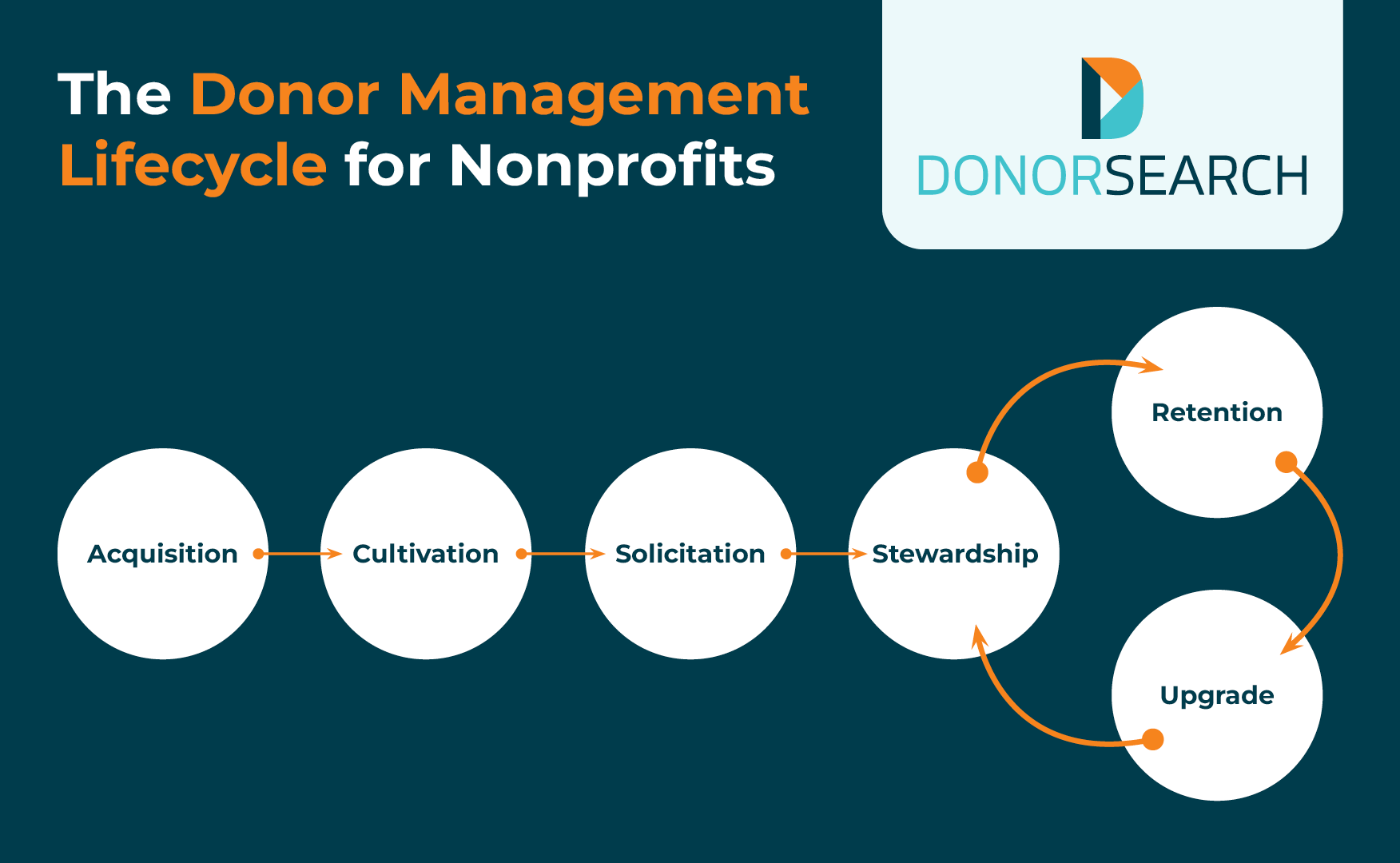
To make the most of prospect research, the process and the information you find shouldn’t be placed on the back burner once you’ve identified donors. Instead, incorporate your prospect research data—and the insights your AI tools provide—at every stage of the donor lifecycle. 

Here is a quick breakdown of how to do this:

  • Acquisition: Use predictive modeling scores to prioritize outreach and prospect reports to choose the best channel to contact each potential donor
  • Cultivation: Generate data-driven materials to guide initial prospect meetings, streamline follow-ups, and use insights to select the right ways to engage prospects in other ways before they give (volunteering, events, etc.)
  • Solicitation: Select a data-backed gift amount and designation to present to each donor, and generate presentation materials and leave-behinds for one-on-one asks
  • Stewardship: Choose methods and create materials to thank donors in a way that makes each of them feel appreciated
  • Retention: Determine the impact information and stories that are most relevant to each donor and re-establish a regular, streamlined communication cadence to keep them engaged
  • Upgrade: Pick the right time to ask each donor to level up their support and decide what upgrades would be reasonable to request.

As you can see, all three types of AI prospect research solutions play essential roles throughout donors’ entire journey with your organization. Continue gathering and analyzing data throughout the process as well so you always have the most up-to-date information on each prospect’s wealth and philanthropic activity to inform your strategy.

A Note on Using AI Responsibly

Although AI can greatly benefit your nonprofit when used effectively, it’s still an emerging field, and there are risks associated with using AI improperly. However, your organization can minimize these risks (and maximize the benefits of AI!) by committing to responsible AI use before you start incorporating it into your prospect research processes.

To help nonprofits like yours leverage AI responsibly, the Fundraising.AI collaborative has developed a framework you can use to inform your organization’s AI guidelines. Some of the areas it covers include:

  • Data security. Especially when used for prospect research, nonprofit AI tools often process personal, sensitive information. As explained in Double the Donation’s donor data management guide, your organization should protect this information by working with trusted AI providers, implementing access controls, encrypting systems, and regularly updating your tools.
  • Inclusiveness. Depending on the data your AI tools are trained on, they could introduce unintended biases into your decision-making and content creation. Actively combat these biases by carefully checking new data inputs and your solutions’ outputs to ensure they represent your organization’s community equitably and fairly.
  • Transparency. Your nonprofit’s donors, board, sponsors, funders, and other stakeholders will likely be interested in how your team leverages AI and the steps you’re taking to ensure it’s used ethically. Clearly communicate your AI policies, methodologies, and results to these audiences to hold your nonprofit accountable to its community.

Additionally, because AI is constantly evolving, it’s essential to stay on top of developments in the field, whether they’re legal, ethical, or technical. Regularly update your policies and create continuous learning opportunities for your team to keep your AI practices—and, therefore, your prospect research activities—up to date.

4 Steps to Successful Peer-to-Peer Team Fundraisers

4 Steps to Successful Peer-to-Peer Team Fundraisers

While artificial intelligence might be on the rise in the nonprofit sector, personal, human connections still reign supreme when it comes to fundraising. Technology can certainly back up your efforts, but most major gifts are given based on one-on-one relationships, personal recommendations are more effective than algorithmic ads, and peer-to-peer campaigns remain one of the most promising types of fundraisers.  

Peer-to-peer fundraisers leverage individual supporters’ connections to earn funding on your behalf. However, participants don’t have to work alone through a peer-to-peer team fundraiser. 

Perfect for schools, sports teams, and advocacy groups, this guide will dive into tips for running a successful team peer-to-peer fundraiser. But first, let’s explain how this twist on a classic fundraiser works. 

What is a Peer-to-Peer Team Fundraiser?

Peer-to-peer fundraisers involve supporters fundraising on your behalf by asking their friends and family to donate to a personalized donation page. This fundraiser leverages supporters’ networks to bring in donors who might not otherwise know about your nonprofit but are motivated to give due to their relationship with the supporter who is fundraising. 

Peer-to-peer campaigns usually involve many individuals fundraising. In a peer-to-peer team fundraiser, a group of people leverage their personal networks and direct donors to a fundraising page shared by the whole team. 

For example, a school might host a peer-to-peer team fundraiser to raise money for the fifth graders’ annual field trip. First, the school would create a fundraising page for each fifth-grade classroom. Then, the school would challenge the classrooms to raise as much as possible and earn more than the other classrooms.

Peer-to-peer team fundraisers combine the effectiveness of peer-to-peer fundraisers’ reliance on personal networks and the motivational power of working as a group to bring in major funding. 

1. Determine Your Format

Peer-to-peer campaigns generally have two possible formats: 

  • Rolling campaigns operate continuously, and supporters can jump in at any time to start their own peer-to-peer fundraiser. Rolling campaigns are easier to do for individual peer-to-peer fundraisers than team-based ones, but it is still possible to host a team fundraiser this way.
  • Deadline campaigns have a specific endpoint, usually marked by an event. For instance, schools might pit classrooms against each other in a read-a-thon-based team fundraiser to earn funding and promote childhood reading. The read-a-thon lasts for a month, classrooms compare their fundraising totals, and the top-earning class earns a pizza party. 

Rolling campaigns inspire continued participation and are a good format for nonprofits running peer-to-peer campaigns where individuals or teams can participate. This format tends to be less competitive since there is no set endpoint where a winner is chosen. 

However, a deadline campaign will likely better serve nonprofits interested in capitalizing on the friendly competition peer-to-peer team fundraisers can inspire. 

2. Recruit Supporters

Peer-to-peer team fundraisers need supporters to fill out those teams. Normally, peer-to-peer campaigns recruit participants like you would recruit volunteers for any other type of initiative. 

For instance, you might send personalized messages to top supporters, share stories about the impact your past campaigns have made, or stress the benefits of participating, such as directly supporting a good cause. 

When adapting to a team fundraiser, your recruitment messages should instead focus on a sense of community and competition. For example, you might create messages like:

We know you care about homeless dogs and cats, and now’s your chance to make an impact! Gather five or more friends to form a team and fundraise for animals in need. All proceeds will support our local shelters, and top teams will be recognized at our year-end event. Prove you’re a true furr-end to pets in need!

Messages like this emphasize the agency of peer-to-peer fundraisers and issue a challenge to supporters, encouraging them to get competitive and do their best to fundraise for your cause. 

3. Host Onboarding Sessions

For the most part, peer-to-peer fundraisers run themselves, and this does doubly so for peer-to-peer team fundraisers, where supporters can work with their teammates to answer questions and overcome challenges. However, your nonprofit should still ensure all fundraisers start off on the right track by hosting onboarding sessions. 

During these training meetings, prepare your fundraising participants by:

  • Walking through any software. Your peer-to-peer fundraising software should be intuitive, but participants will still likely benefit from a brief walkthrough of how your donation tools work. 99Pledge’s guide to team fundraising platforms recommends purchasing from a vendor who will set up your fundraising pages for you, so individual teams won’t need to worry about designing their pages. 
  • Going over behavioral expectations. While individual fundraisers will operate independently, ultimately, they represent your nonprofit. As such, discuss how representatives of your cause are expected to conduct themselves and share brand assets so they can create content consistent with your brand identity
  • Answering questions. In a peer-to-peer team fundraiser, participants can work together to brainstorm solutions and implement creative strategies. However, it’s still normal for new fundraisers to have questions, and your onboarding process is the perfect time to answer them. 

If your nonprofit is hosting a rolling peer-to-peer campaign, consider if any changes at your organization will impact the supporters who are fundraising on your behalf. For instance, if you’re changing CRMs and need to sync your peer-to-peer platform to your new software, implement a thorough change management strategy so supporters using your peer-to-peer tools won’t be interrupted or will only need to pause their campaigns for a short period of time.

4. Instill Friendly Competition

Peer-to-peer team fundraisers should encourage teams to compete to try to outraise one another. Supporters ultimately understand that rival teams are still raising money for the same cause, but they’ll also feel challenged to fundraise as much as they can knowing that others are trying to outdo them. 

You can encourage competition by:

  • Naming teams. Give teams a sense of identity by letting them name themselves. You may even take this a step further by assigning them team colors or mascots. 
  • Creating a leaderboard. Host a leaderboard on your website that teams can track to see their real-time progress. Every time a donation is made to one team’s donation page, your leaderboard will update to show who earns the most for your cause. 
  • Offering a prize. While participants want to support a good cause, an award is also always appreciated. This might be a trophy, a pizza party, or free t-shirts. 

No matter how well teams performed, be sure to thank all participants for their hard work. eCardWiget’s donor recognition guide shares one memorable way to do this: eCards. eCards take typical thank-you emails up a notch by adding eye-catching visuals that represent your brand, like this one from the nonprofit Youth for Understanding: 

Additionally, thank those who contribute to your peer-to-peer campaign to boost donor retention. First-time peer-to-peer donors can be difficult to retain since they’re likely giving due to a connection with one of your fundraiser’s participants rather than your cause. Your thank-you message is an opportunity to invite them to explore your nonprofit and encourage them to continue donating even after your peer-to-peer campaign wraps up.

Peer-to-peer team fundraisers are an effective way to engage your supporters, raise funds, and spread awareness of your cause to new audiences. Of course, if it’s your first time running one of these campaigns, it may be overwhelming. If this is the case, consider working with a fundraising consultant to ensure your nonprofit is ready and implement the best practices for managing a successful campaign. 

Hosting Successful Virtual Fundraising Events: 5 Considerations

Hosting Successful Virtual Fundraising Events: 5 Considerations

Modern life is more fast-paced than ever. In fact, according to a recent poll, 60% of American adults believe there aren’t enough hours in the day to get everything done. Many of your nonprofit’s donors likely feel the same. They may have every intention to support your cause, but life gets in the way.

That’s where virtual fundraising events come in—eliminating the need for your supporters to worry about travel, childcare, or mobility issues when attending. Plus, there are plenty of virtual event ideas to engage your community, from auctions to scavenger hunts.

With all of your attendees separated by screens, however, planning a seamless and engaging event experience is essential. Let’s walk through five considerations to set your next virtual fundraising event up for success.

1. Building a Virtual Event Toolkit

Before you can plan and execute a stand-out virtual event, you need reliable, comprehensive technology to facilitate it.

For example, if your nonprofit is planning a virtual auction, you might research online auction software with tools and features such as:

  • Mobile bidding. Streamline the bidding process by allowing your attendees to view, track, and update their bids in real time from their smartphones. 
  • Livestreaming. Capture the live excitement and broadcast your event in real time, helping attendees feel like part of the action. Many live-streaming platforms include chat features, enabling guests to connect with each other and find a sense of community from afar.
  • Sponsorships. Integrating sponsorship features into your event software allows you to showcase partners prominently, offering them valuable exposure while helping you cut down on event costs and boost your fundraising potential.
  • Payment processing. Efficient payment processing solutions are crucial for handling donations and bids quickly and securely, providing attendees with a hassle-free way to support your cause during the event.

Once you’ve done your research, it’s time to choose the right virtual event software—this decision involves setting a budget, reading reviews, and requesting demos. Take this opportunity to identify any additional tools that could enhance your event and streamline processes for your planning team, such as generative AI platforms to support marketing content creation.

2. Securing Corporate Sponsorships

According to 360MatchPro, corporate sponsorships are a mutually beneficial partnership between a company and a nonprofit. The company funds your event or project, and in exchange, your organization publicly recognizes the support on its website and other marketing materials.

Follow these best practices when securing sponsorships for your nonprofit:

  • Research local businesses that align with your mission and values. Start by identifying local companies whose corporate social responsibility goals match your nonprofit’s mission. This alignment increases the chances of securing a sponsorship and fosters a long-term partnership that benefits both parties.
  • Create virtual event sponsorship packages. Design tiered sponsorship packages that offer businesses different levels of visibility and benefits. These packages can include options like logo placement on event materials, mentions during the event, and featured content on social media platforms.
  • Draft up a sponsorship agreement. Prepare a clear and detailed agreement that defines what each party can expect and gain from the partnership. It should detail the length of the sponsorship, ways your sponsor will be recognized, and all logistical aspects to ensure everyone understands their roles and contributions.

Beyond covering event costs, many companies are willing to provide volunteers and in-kind donations, such as auction items. These could include signed memorabilia from popular sports teams, exclusive experiences like private vineyard tours or cooking classes with renowned chefs, or high-tech gadgets such as the latest smartphone or tablet. 

3. Promoting the Event

While virtual events allow your nonprofit to reach a broader audience, you still need to get the word out to these potential attendees first.

Incorporate a variety of marketing channels into your strategy, such as:

  • Your website. This should serve as the central hub for your event information. Update it regularly with event details, compelling calls to action, and easy registration links to ensure visitors have all they need in one place.
  • Email. Utilize email campaigns to connect with both past and potential supporters. Craft messages that spotlight the special features of your virtual event, and send personalized invitations that speak to the interests of different audience segments.
  • Social media. Leverage your social media platforms to create buzz and foster engagement around your event. Post regular updates, behind-the-scenes content, and interactive posts and polls that encourage followers to share and comment.
  • Text messages. Send concise, timely text message reminders and updates leading up to your event. This direct line of communication is perfect for last-minute announcements and helps keep your event fresh in everyone’s minds.

To maximize the impact of these efforts, use the information in your nonprofit’s database to segment your audience and send tailored communications to each group. For instance, you might send a message to past event attendees highlighting previous event moments they might have enjoyed and promoting new guest appearances at your upcoming event.

4. Engaging Virtual Attendees

While virtual fundraising events offer many benefits, the format can make it challenging for attendees to feel connected with one another. It’s easy for them to get distracted by their surroundings when participating through a screen.

Use these tips to maintain attendee engagement throughout your virtual fundraising event:

  • Create live polls and Q&A sessions. These interactive elements keep your guests actively involved and allow them to share their opinions, making your event more personalized and responsive to your audience’s interests.
  • Incorporate gamification through challenges and quizzes. Spice up your event with interactive quizzes about your cause or fun challenges, such as a virtual scavenger hunt. These elements keep the energy high and are a great way to break up the fundraiser aspects of your event. 
  • Use breakout rooms to encourage attendees to socialize. Facilitate smaller, more intimate group interactions with breakout rooms. This setting allows attendees to discuss topics in depth, network with their peers, and build connections that can deepen their sense of community and involvement.

Put yourself in an attendee’s shoes. What would inspire you to attend a virtual fundraising event? Many people are drawn to help make a difference and connect with like-minded individuals who are passionate about the same cause. Use these insights to guide the engagement strategies you implement during your event.

5. Follow Up After the Event

A successful nonprofit event not only fulfills its immediate fundraising goals but also sets the stage for higher attendance and engagement the next time around. Immediately following your event, SchoolAuction.net recommends sending personalized thank-you messages to attendees without any additional monetary requests. Instead, focus on the impact of their donations and everything you’ll be able to accomplish thanks to their support.

To effectively gauge attendee satisfaction and gather valuable insights, consider sending a post-event survey. You might ask questions such as:

  • On a scale of 1-5, how satisfied were you with your overall experience?
  • What did you enjoy most about the event?
  • On a scale of 1-5, how easy was it to access and navigate the event?
  • What improvements, if any, would you like to see at our next event?
  • Would you attend another virtual event hosted by our organization? Why or why not?

Although it may not be possible to act on every piece of feedback, analyzing these responses will help you understand which elements of your event were most effective and which areas you should prioritize improving in the future.

Track metrics such as attendance, total funds raised, and average donation amount to assess your virtual event performance. By doing so, you’ll be able to make strategic improvements and plan more successful virtual events year after year.

AI for Good: How Nonprofits Can Use Artificial Intelligence

AI for Good: How Nonprofits Can Use Artificial Intelligence

Technology moves quickly; and organizations in every industry—including the nonprofit sector—are eager to keep up. With major advances in artificial intelligence (AI), it’s only natural that many nonprofits are wondering whether they should use this technology and what the ramifications of using it are.

In this brief walkthrough, we’ll go over how AI can play a role in data-driven marketing, day-to-day operations, and long-term nonprofit planning. Before exploring practical applications of AI, let’s first explain exactly what AI is.

What is AI for Nonprofits?

Today’s AI platforms typically perform one of two tasks: content generation or data prediction. Let’s take a close look at these two AI types:

  • Generative AI. Most popular AI platforms, like ChatGPT, are language learning models (LLM), which can mimic human writing by analyzing large, text-based datasets and using that information to make educated guesses about what words and phrases make sense together. AI that generates images, videos, and music operates similarly, using pre-existing content to create new work.
  • Predictive AI. Nonprofits have been using predictive AI tools for years before the rise of AI in the public zeitgeist. These tools can analyze your nonprofit’s data to predict future trends. For instance, you might use AI to examine your total fundraising revenue every month for the past five years and predict how much you’ll be able to raise each month next year.

Ultimately, AI is a tool, and the better data you provide it with, the better your results will be. With that in mind, let’s explore how nonprofits can use generative and predictive AI.

Generative AI

Generative AI, as the name implies, generates content. As such, it has several potential use cases for nonprofits. A few of these include:

Content Creation

Large Language Models (LLMs) are designed to create written content, from fundraising emails to presentations to flyers and more. 

While AI should not be your sole means of copywriting, it can still be useful in your content creation process. A few applications of AI include:

  • Brainstorming. While AI might have quality issues, it excels at quantity. For example, you might ask AI to generate 20, 50, or even 100 blog topic ideas and pick out the best ones for your copywriters to write.
  • Outlining. AI can quickly assemble rough outlines for a variety of content types. This is especially useful for content with rigid formatting. For instance, you might ask AI to outline a request for proposal (RFP) and fill in the details for each potential partner yourself.
  • Proofreading. LLMs have existed since long before ChatGPT in the form of spell checkers. Use AI to catch spelling, grammar, and stylistic errors in your content.

Some types of written content are better suited for generative AI than others. For instance, a story from one of your beneficiaries likely needs little, if any, input from AI, whereas a thank-you message template could be almost entirely AI-created.

Dangers of AI

Due to its limitations, it’s best to view AI as your partner, rather than relying on it exclusively to generate your content. Some issues with AI include:

  • False information. AI often makes up facts and reports false information as if it were true.
  • Unoriginal content. AI cannot perform its own research or make connections the way a human can. As a result, AI content is often vague or generic.
  • An “AI style” tone. Since AI platforms base their outputs on data and algorithms, the resulting writing can lack the human touch that skilled human writers provide. Consequently, most AI writing sounds similar to other content written by AI, which can hurt your branding and fail to resonate with your audience unless you train it to generate content in your organization’s brand voice.”
  • Privacy and ethical considerations. Talk with your legal team about how you use donor information and know that unless you are using a proprietary AI system, all information you feed into AI (and that it generates for you), is fed back into its algorithm. 

Administrative Tasks

Additionally, LLMs can analyze writing for your nonprofit. For instance, Zoom and other meeting systems can transcribe and summarize conversations, and generate To Do lists.

This is just one example of the role AI can play in administrative tasks. From scheduling to email management, AI can step in to handle time-consuming tasks and generate basic messages that don’t require a human touch.

Predictive AI

AI learns by analyzing data. As such, predictive AI can assess your nonprofit’s past data to make educated guesses about your organization’s future.

For instance, Deep Sync’s guide to marketing analytics explains ways predictive analytics can make sense of your data:

  • Learn about your supporters. Analyze your donors’ actions to find behavioral trends. For example, your AI software might discover the characteristics of a donor at risk of lapsing or a supporter who is likely to be receptive to an upgrade request.
  • Build lookalike audiences. Some AI tools can use your donor data to build an AI-powered lookalike audience, helping you reach new prospective donors with similar attributes to your current donors.
  • Customize donation forms. Using predictive analysis, AI is being used to serve up custom donation amounts on donation forms to specific donors by analyzing the donor’s giving history and combining that with other data (such as the user’s IP address).
  • Increase revenue. Data-informed decisions typically produce more positive results. For nonprofits, this means improved fundraising, leading to increased growth and capacity to fulfill your mission.

To ensure your AI has extensive data needed to make it useful, you may need to expand and refine your data collection practices. Look to collect first-party data at every touchpoint with your audience — such as on donation forms, registration forms, event registration, social media polls, etc. All of this should be fed into your constituent relationship management platform (CRM).

Artificial intelligence is a flexible tool, and when used right, it can elevate your nonprofit’s efficiency and effectiveness. Get started with AI by researching tools designed to complete the content creation, administrative, and analytic tasks you need to be done.

How Nonprofits Can Keep Their Brands Relevant With Howard Levy

How Nonprofits Can Keep Their Brands Relevant With Howard Levy

The Nonprofit MBA Podcast

Keeping a nonprofit brand relevant is an ongoing process that requires a strategic and proactive approach. By staying true to the mission, adapting to societal changes, engaging effectively with the audience, leveraging technology, innovating programs and services, building trust and transparency, and investing in brand identity, nonprofits can ensure their brand remains vital and impactful. In such a dynamic world of ours, a relevant nonprofit brand is not just an asset—it’s a necessity for lasting impact and success. In today’s podcast, Howard Levy from Red Rooster Group and Stephen Halasnik from Financing Solutions, a leading provider of business loans for nonprofits, discuss how nonprofits can keep their brands relevant.

Read an Executive Summary or Listen to the Podcast HERE

GUEST SPEAKER: Howard Levy, President of Red Rooster Group

Howard Levy is President of Red Rooster Group, and he’s been helping nonprofit organizations overcome hurdles and inertia to wake up their brands and achieve their missions for decades. Right out of college, he founded one of the first marketing agencies focused specifically on the needs of the nonprofit sector. In the three decades since, he’s helped hundreds of organizations across a range of causes to revitalize their brands, shore up their marketing, and raise millions for their organizations.

HOST: Stephen Halasnik, The Nonprofit MBA Podcast, and Financing Solutions

Stephen Halasnik co-founded Financing Solutions, the leading provider of lines of credit for nonprofits and church financing. The credit line program for nonprofits and churches is fast, easy, inexpensive, and costs nothing to set up, making it a great backup plan when cash flow is temporarily down. Mr. Halasnik is also the host of the popular Nonprofit MBA Podcast. The podcast brings experts to discuss fundraising, nonprofit grants, executive director leadership, nonprofit boards, and other important topics. You can learn more about the nonprofit line of credit program here or call 862-207-4118.

Nonprofit Impact Reports: How to Create and Share Them

Collage of woman holding document with graphic of impact report

Nonprofit Impact Reports

How to Create and Share Them

Collage of woman holding document with graphic of impact report

Imagine you’re a donor. You hear about a nonprofit’s cause, feel compelled to support it, and donate through one of the organization’s various fundraising methods. After clicking “Submit,” your work is done.

As a nonprofit professional, you know that this seemingly simple process is actually far from simple—it takes a lot to spread awareness of your cause, cultivate relationships with donors, and use their contributions wisely to drive your mission-centric tasks. 

That’s why nonprofit impact reports are essential to building trust with donors and encouraging continued support. These reports detail your organization’s progress and achievements, bridging the gap between donors’ contributions and the tangible effects of your work. Let’s take a closer look at the steps your nonprofit should take to create your own impact report.

1. Plan and Prepare Your Materials

Foundation Group describes nonprofit bookkeeping as the first step your organization must take to prepare for every deep dive into your assets, including impact reports. Since the purpose of the report is to show how your organization turns donations into meaningful results, your bookkeeping data is the first place you should look. 

Other than financial data, there are a few other elements most nonprofit impact reports include:

  • Opening statement, which is a brief introduction at the beginning of your report
  • Impact numbers, including key metrics and statistics that quantify your nonprofit’s achievements and impact
  • Updates and announcements regarding significant developments in your nonprofit within the time frame covered by the report
  • Stories and quotes from beneficiaries, volunteers, donors, staff members, board members, and other people deeply involved in your organization
  • Visuals such as photos, videos, infographics, and charts used to demonstrate the power of your nonprofit’s work

If you need help determining what elements should be included, start by establishing the primary goals of the report based on your target audience. This will help you narrow down elements to include. Then, start gathering the data you’ll need to include. You may delegate data collection to a specific team to streamline the task. Be sure to establish clear deadlines for when all data should be consolidated.

2. Choose a Format

Next, use your data to gauge how long your impact report should be and how you’ll structure it. Organize each element into clear sections, such as:

  • Introduction
  • Activities
  • Outcomes
  • Financial data
  • Stories 

For example, consider the categories included in this example of a nonprofit impact report from LifeMoves:

Impact report page showing impact measurements

This report breaks down Lifemoves’s activities into several categories: location, target population, approach, and results. In addition to using clear categories, the report uses infographics and illustrations to condense data points into an eye-catching summary.

As you begin sorting your content into their respective categories, you’ll begin to have an idea of the layout your report should follow. Use this outline to decide how you’ll format the report. For example, will it exist as a page on your website or a downloadable file?

When choosing a format, prioritize readability and accessibility. Remember, the goal is to break down your nonprofit’s complex activities into an easily digestible report. It should be well-organized so all readers can glean valuable insights.

3. Fill in The Details

With a basic plan in mind for what you’ll include and how you’ll structure your report, it’s time to start filling it in! Start with a compelling introduction to capture readers’ attention and clarify the purpose of the report, then dive into the data you want to share.

Treat your report like a window into your nonprofit’s behind-the-scenes work. For example, you might briefly explain what a 501(c)(3) is and how your organization is committed to maintaining that status. This helps donors better understand the way your nonprofit operates, which, in turn, will increase their trust in your organization. 

Use cohesive language and branding throughout the report. Break down any industry terms and offer insights for each data point you provide. Saying that your program helped 7,000 people, for example, would be less significant to readers without the context that your program only reached 3,000 the year before.

4. Publish & Share Your Report

While it’s clear you should share your report with existing donors and stakeholders, you should also show it to prospective supporters. Use a variety of channels to share your report, including:

  • Your website: Whether your report exists as its own page or is simply featured as a downloadable resource, connecting it to your nonprofit’s website is vital to directing readers to learn more about your organization. For example, the activities of a private foundation will differ greatly from those of a public charity.
  • Emails: Send your impact report to your email list using segmentation and personalized messages to pique interest. You may contextualize the report differently for volunteers, for example, than you would for major donors. Use snippets and quick highlights in the email to encourage recipients to read through the report.
  • Social media: Make your report stand out on social media by recapping key findings and impactful statistics in visually appealing ways across various channels. Post images, videos, and other visual elements included in your report to quickly capture followers’ attention and compel them to read the full report. 

You can also encourage your community to explore the report by hosting a live webinar or event to go over the report’s data. For example, discussing a specific program’s performance, as summarized in the impact report, can help your team identify areas for improvement and show your community where you need their help the most.

While your nonprofit’s impact report is not a fundraising channel, it still holds immense power to compel readers to give. Approach the report as a story in which your supporters are the heroes—at the end of the day, they’re the ones who made your accomplishments possible. Don’t be afraid to include calls to action throughout your report to remind readers that their involvement is still needed.

Nonprofit Impact Reports

Cover of annual report for American Friends of the Hebrew University of Jerusalem
Cover and spread of UMFS annual report